




ABOUT THE GAME
About Triumph Rocket 3 Puzzle
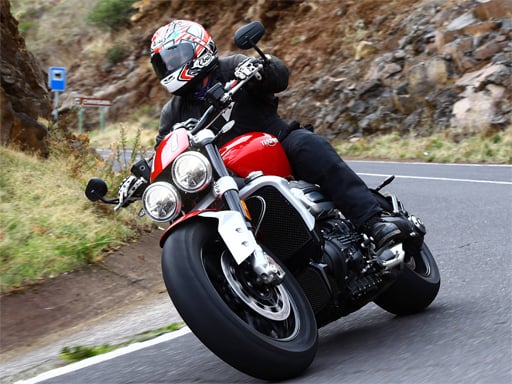
Play with 6 images in this perfect jigsaw puzzle game: Triumph Rocket 3 Puzzle. All images feature the triumph rocket 3 motorcycle. Solve all puzzles and keep your brain sharp. You have four modes for each picture: 16 pieces, 36 pieces, 64 pieces and 100 pieces. Enjoy and have fun.
QUICK FACTS
- Category
- Puzzle
- Platform
- Browser (PC & mobile)
- Control
- Use mouse to play this html5 motorcycle games.
- Orientation
- Landscape
- Developer
- Not specified
CONTROLS
Control
Use mouse to play this html5 motorcycle games.
Control
Select one of the six available images to begin your jigsaw puzzle journey.
Control
Choose your desired difficulty level - start with 16 pieces if you're new to jigsaw puzzles, or challenge yourself with 100 pieces for a true test of patience…
Control
Click and drag pieces from the tray onto the puzzle board.
SCREENSHOTS
In-Game Screenshots
Why Triumph Rocket 3 Puzzle Keeps Pulling Players Back
Triumph Rocket 3 Puzzle is a jigsaw game with a clear subject: six images of the magnificent Triumph Rocket 3 motorcycle, rendered as puzzles you can solve at four difficulty levels. It is a game built around a love of the machine - every solved image reveals another angle of the Rocket 3’s muscular design, from its massive engine to its distinctive silhouette.
The appeal is the satisfying clarity of jigsaw puzzles combined with real variety. Each of the six images gives you a new picture to assemble, and each picture can be solved at 16, 36, 64, or 100 pieces. That range means the game works for every type of player: casual puzzlers can relax with a 16-piece image in a few minutes, while puzzle masters can push their patience and spatial skills with the full 100-piece challenge.
The time tracking adds the competitive layer. Every puzzle records your completion time, which turns a relaxing activity into a quiet challenge: beat your best time, solve all four difficulties of all six images, and you have a complete record of your jigsaw skill. It is brain-sharpening, visually satisfying, and remarkably easy to pick up whenever you have a few minutes.
What a Smooth Puzzle Solve Looks Like
A smooth solve in Triumph Rocket 3 Puzzle follows the classic jigsaw method. The loop is: choose an image, choose a piece count, sort the pieces, build the border, fill in the interior, and finish with the satisfying snap of the final piece.
| Phase | What is happening | What to do |
|---|---|---|
| Select | Choose image and difficulty | Match difficulty to your mood |
| Sort | Separate edge and interior pieces | Find the frame first |
| Border | Build the outer edge | The frame anchors everything |
| Fill | Complete the interior | Work by color and shape regions |
| Finish | Place the final piece | Celebrate the completed image |
The method matters more than speed. Players who sort first and build the border second solve puzzles far faster than those who attack the interior randomly. On a 100-piece puzzle, the sorting phase is the difference between a relaxing session and a frustrating one.
Selecting, Dragging, and Assembling
The controls are simple and tactile: use your mouse to play. Select one of the six available images to begin, then choose your desired difficulty level - start with 16 pieces if you are new to jigsaw puzzles, or challenge yourself with 100 pieces for a true test of patience and skill. Click and drag pieces from the tray onto the puzzle board, and when a piece is close to its correct position, it will snap into place.
| Control | Action | When it matters |
|---|---|---|
| Click | Select a piece | Choosing what to place |
| Drag | Move the piece | Positioning on the board |
| Drop | Place the piece | The snap feedback confirms it |
| Select image | Choose a puzzle | Six different compositions |
| Select difficulty | 16 / 36 / 64 / 100 | Scaling the challenge |
The snap-into-place mechanic is what makes the game feel good. Pieces that are near their correct position lock in with satisfying feedback, which keeps the flow smooth and reduces the frustration of pixel-perfect placement.
Techniques That Turn a Good Solve Into a Fast One
- Build the border first. The frame is the anchor - it gives every interior piece a reference point.
- Sort by color and shape. The Rocket 3’s images have distinct regions - engine, bodywork, wheels - that group naturally.
- Work in small sections. Complete recognizable regions before connecting them to the whole.
- Use the preview. If the game offers a reference image, glance at it to orient difficult pieces.
- Beat your own times. The timer is the real opponent; replay to improve.
Mistakes That Slow a Puzzle Down
The most common mistakes in jigsaw play are method errors. Attacking the interior before building the border leaves you without anchors. Failing to sort pieces means constant searching. And staring at the whole image instead of breaking it into regions overwhelms your spatial memory. On the 100-piece difficulty these mistakes compound, turning a pleasant session into a long grind.
| Mistake | Why it slows you | The fix |
|---|---|---|
| Interior first | No frame to reference | Build the border first |
| No sorting | Constant searching | Separate by color and edge |
| Treating the image as one blob | Overwhelmed | Work in recognizable sections |
| Racing the timer | Errors and rework | Solve cleanly, speed follows |
Six Images, Four Difficulties, and Mastery
The structure of Triumph Rocket 3 Puzzle - six images times four difficulties - creates a clear mastery ladder. Each difficulty of each image is an independent challenge with its own best time, which gives the game twenty-four discrete goals. The 16-piece versions are gentle warm-ups; the 100-piece versions are genuine tests of spatial reasoning and patience. Completing all twenty-four, and improving each time, is the game’s quiet endgame - and for fans of the Triumph Rocket 3, each solved image is also a small gallery of the machine they love.